Every receipt, read and kept.
Scan a receipt and Risy reads every line, files it under Business or Personal, and has it ready when the year ends. No typing, no shoebox.
- Made in Canada, for Canadians
- Your records are stored in Canada

One button. The rest is Risy.
From a photo to a filed record, with nothing to type. You step in only when Risy asks.
- 01
Scan
Point the camera and tap Save. Photos, screenshots and PDFs work too. The file is stored on your phone first.
- 02
Risy reads
Store, date, every line, GST/HST and the total. If something does not add up, Risy asks you to check.
- 03
It is filed
Business or Personal, with a category. Correct it once and Risy remembers for that store.
The receipt, as it was printed.
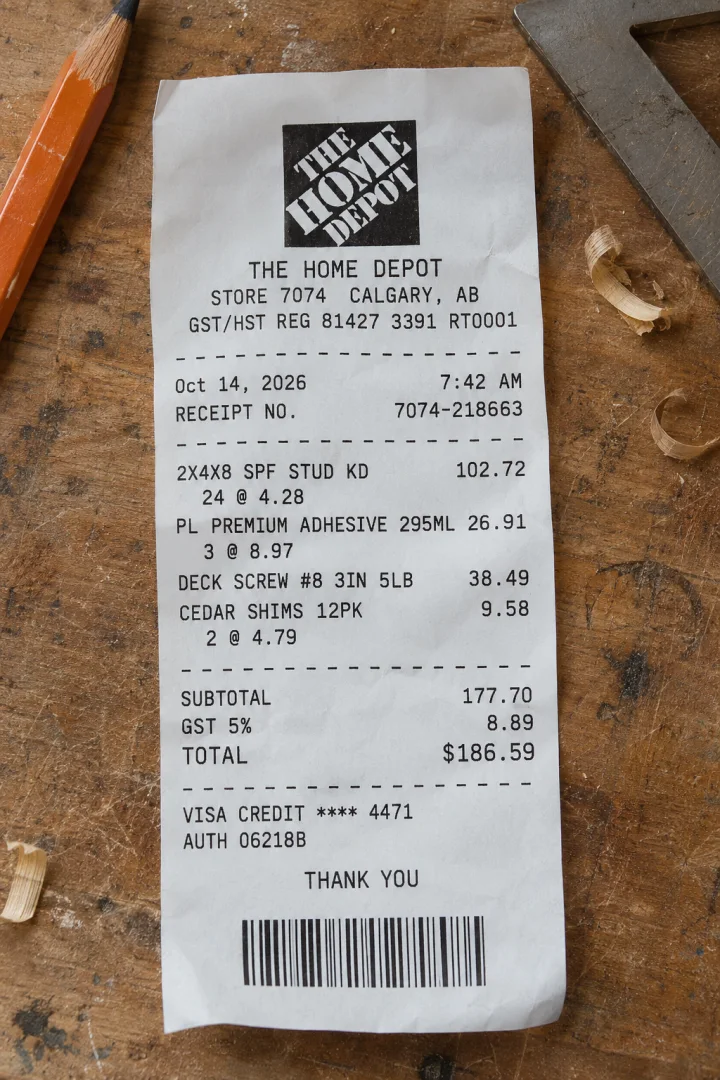
Each record opens as the paper it came from: the store, the lines, the tax, how it was paid. Coded lines get plain names, so you can find the deck screws next spring.
- Every line with its quantity and price
- GST/HST, PST and QST kept apart
- The original photo one tap away
- Your edits always win over a new read
Business and Personal, sorted for you.
Work and household spending share the same cards. Risy files each receipt by what is on it and what you do for work, and asks only when it cannot tell.
- The read picks the book and one of 42 categories
- Unsure? One tap answers it
- Fix it by asking, with Undo

One purchase counts once.
The same purchase shows up as a receipt, a screenshot from your banking app and a line in a statement. Risy links them into one record, so your totals are not doubled. It does not connect to your bank: you add the screenshot or the PDF.
- A bank screenshot proves the payment
- Lines of a statement PDF link to receipts
- In doubt, Risy asks instead of merging
See where the month went.
A month of spending at a glance, against the month before. Other currencies are listed apart and never mixed into Canadian dollars.
- By book, category and store
- Down to the receipts behind every total
- GST/HST as one figure per quarter, in CAD
Ask your receipts.
Ask in plain words, by text or by voice. Risy answers with figures counted from your own records, shows the receipts behind them, and says so when it finds nothing.
- “Where did my money go this month?”
- “What did eating out cost me?”
- “How much went on work this year?”
Statements fill the gaps. Subscriptions surface.
Statements hold the payments that never had a receipt. Risy reads them into records, links the ones you scanned, and finds the bills and subscriptions that repeat, with what each costs a year.
- Send PDFs to the chat, months at a time
- Overlapping statements add nothing twice
- Price changes and next charges flagged







The whole year in one package.
One ZIP per year and book, for you or your accountant. Exporting is free and stays free: your records are available while you have an account, and you can take them out at any time.
- A summary PDF, CSV and JSON
- Every original image and PDF
- A capture log with keep-until dates
Every year on a big screen. One link for your accountant.
The same records in a browser: every receipt beside its photo, year after year, on a screen made for going through them. Send your accountant a link, and they see what you chose to share without an app, an archive or an attachment.
- Search and filter several years at once
- A view-only link, for the book and the years you pick
- Access ends on the date you set, or when you remove it
A Canadian product, for Canadians.
Risy is built in Alberta, Canada for the way people here keep records: our sales taxes, our dollars, an accountant down the street. And your records are kept on servers in Canada.
Your records are stored in Canada
Receipts, statements and chats are kept on servers in Montréal. To read a receipt, Risy sends it to an AI provider, and the privacy policy names each one and its country.
GST/HST, PST and QST
Sales taxes are read and kept apart the way Canadian receipts print them, with GST/HST as one figure per quarter.
Canadian dollars first
Totals are in CAD. A purchase in another currency is listed apart and never mixed in.
Ready for your accountant here
The year archive is a summary for your records, in English, laid out for an accountant in Canada.
Canada first
The first release is for Canada alone: the App Store in Canada, December 2026.
Your records are the point. The AI is the help.
Receipts are financial records, so the rules came first. These are a few the app is built on.
Saved before anything else
A scan is stored on your phone before any network call. If a read fails, the record stays, with Try again and Enter by hand.
The photo is the source
What AI reads is a draft. You can fix the store, the date, the total and the tax, and a new read never overwrites your edits.
Numbers come from your records
In the chat, every figure is counted by the app from your records and checked before you see it. The AI never writes the totals.
Changes you can undo
The chat changes records only through cards with Undo or a button you tap. It cannot delete records in bulk.
No ads, no tracking
No ad SDKs and no analytics SDKs in the app. Your records are not sold and are not used for advertising.
Yours to take or delete
Export a year at any time, free. Delete your account in the app, and your records and files go with it.
How data is handled, and by whom, is in the privacy policy.
Good to know.
Who is Risy for?
Self-employed people in Canada who keep their own records: tradespeople, freelancers, drivers, consultants, small shop owners. It keeps work and household spending apart, since both often go through the same cards.
Is Risy tax software?
No. Risy organizes receipts and statements and gives you a summary for your records. It does not give tax advice, does not prepare a return and does not file anything. Take the year archive to your accountant, or use it yourself.
How does the reading work?
Your phone finds the paper in the photo and reads its text. Then an AI model reads the store, date, lines, taxes and total. When a total does not add up or the read is unsure, Risy marks the record and asks you to check.
Does Risy connect to my bank?
No. Risy does not sign in to your bank or pull your transactions. You add a screenshot from your banking app or a statement PDF, and Risy reads it and links it to the receipt.
Where does my data go?
Records and files are stored on servers in Canada, so they survive a lost phone. To be read, a receipt is sent to an AI provider. The privacy policy names each provider and the country it works in.
What does it cost?
Pricing will be announced with the release. Reading your records and exporting them stays free, also after a subscription ends.
Which phones and languages?
iPhone first, in English and Ukrainian. The export is in English, for an accountant in Canada. Android comes after the first release.
Do I still need the paper?
Risy keeps the image of each receipt and a log of when it was captured. Whether you can let go of the paper depends on your situation, so ask your accountant.
Hand Risy the next receipt.
Be among the first to try it when it reaches the App Store.
Get early access